
Accessing an Autonomous Database from an OCI Function

Connect OCI Functions to Autonomous Database securely using Vault secrets and Terraform. Complete IaC example with Python code.
Accessing an Autonomous Database from an OCI Function

After seeing how to create a custom image, in the previous case where we installed the Oracle client, now let’s try to use this custom image to connect to an Oracle database.

We will make the most of the cloud capabilities. In this example, we will use the Infrastructure as Code (IaC) methodology to provide a real example of an easily replicable architecture for everyone.

The “toautonomous” project is in the same GitHub repository used so far to talk about OCI Function fn-examples . The project’s README describes the infrastructure configuration procedure.

If you are not familiar with Terraform, I recommend referring to the official documentation and our tutorial and video .

In my case, the terraform.tfvars file will be similar to this (values altered):

1
2
3
4
5
6
7
8
tenancy_ocid = "ocid1.tenancy.oc1..aaaaaaaao4a5a"
region = "eu-frankfurt—l"
compartment_id = "ocid1.compartment.oc1..aaaaaaaawdnpdyjvbala"
root_compartment_id = "ocid1.tenancy.oc1..aaaaaaaa2h4xgua7d4a5a"
registry = "fra.ocir.io/frddomvd8z4q/functions"
application_name = "toautonomous"
vault_ocid = "ocid1.vault.oc1.eu-frankfurt-1.dzsgmkchaafmg.abthe2a"
vault_key_ocid = "ocid1.key.oc1.eu-frankfurt-1.dzsgmkchaafmga2ra"

The IaC code has been developed to handle the entire deployment, from infrastructure to building the custom container for the function and its release. Therefore, within the project folder, simply run the command:

Various resources will be created, not easily represented by this dependency graph created with Terraform:
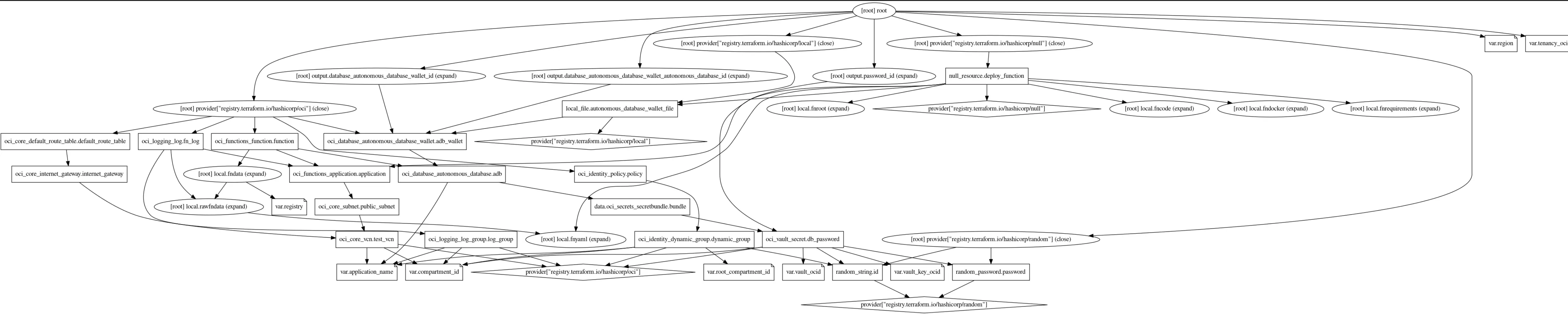
Created Resources

The situation is simpler than you might think. The main OCI resources we will use are:

  • VCN
  • Autonomous DB
  • Function
  • Vault
  • Logging

It’s worth mentioning that before being built, the function will wait for the database to be created and will include the authentication wallet inside the function image. Similarly, the administrative user’s password will be saved and encrypted within the Vault service and obtained at runtime by the function when needed, without saving credential data in the code.

These implementations make the example project very secure.

Here is the function file to better understand its operation.

Frequently Asked Questions

How do I connect an OCI Function to an Autonomous Database securely?

The recommended pattern is to store the database wallet and credentials in OCI Vault, grant the function's dynamic group access via IAM policy, and retrieve credentials at runtime using the OCI SDK. This avoids hardcoding secrets in the container image or configuration.

What is OCI Vault and why should I use it with OCI Functions?

OCI Vault is a managed secrets and key management service. Using Vault with Functions lets you rotate credentials centrally without redeploying the function, and ensures secrets are never stored in code, environment variables, or container images.

Can I connect to Oracle Autonomous Database from Python inside an OCI Function?

Yes. Using a custom Docker image that includes Oracle Instant Client and the python-oracledb package, you can connect to Autonomous Database using mTLS with the wallet downloaded from the OCI console.

Related posts